Thursday, December 8, 2011

Parts of a Computer

Parts of a Computer

Modern computers come in many shapes and sizes. From desktops and towers, to laptops, netbooks, tablets and some smart phones are all computers. While they look different, they share the same basic features and functions.

This quick tutorial should help familiarize you with the parts of a computer system.

All computers are made up of four basic building blocks. Here is a quick overview:

  1. Input: how the computer gets information from you, usually through a keyboard or mouse.
  2. Processing: once you tell the computer what to do, it has to process the information and communicate the result back to us or store it for later retrieval.
  3. Storage: a computer can save information in two basic ways; temporary storage (in memory chips), and more permanent storage (saved to the hard drive or other storage media).
  4. Output: once a computer has processed information it often will send the results back to you through a display monitor or printer.
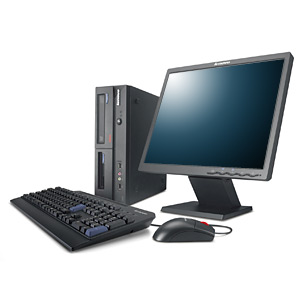
The Computer System
The typical desktop computer system consists of the computer (either desktop or tower unit), a monitor, a keyboard, and a mouse. A complete computer system also includes a set of speakers and a printer.

Inside the Computer Case
The box (or case) of the desktop or tower computer contains several electronic components:

Motherboard, the main circuit board where the processor, memory chips, and expansion cards are attached.

Power supply, converts power from your AC wall outlet to low-power DC needed by the computer components.

A peek inside the Hard Drive
Hard Drive, a device where information is stored and retrieved. Your operating system and application programs are stored here. Some people mistakenly refer to the computer desktop or tower as the "hard drive". A hard disc drive is actually a small rectangular device. It features rotating rigid platters on a motor-driven spindle within a protective enclosure. Data is magnetically read from and written to the platter by read/write heads that float on a film of air above the platters.

Removable Media Drives, allow the reading and writing of data to CD, DVD, and Blu-Ray discs. Removable media may also be in the form of USB thumb-drives, ZIP-disks, tape backups, or memory chips usually used in digital cameras.

The Changing Form of the Personal Computer
The desktop computer is the traditional form of a personal computer. There are a variety of form factors that computers come in, including:

Laptop and Netbook size comparison
Laptop or Notebook Computer, a small battery or AC-powered personal computer hat can easily be transported and conveniently used in temporary spaces such as on airplanes, in libraries, temporary offices, and at meetings. A laptop typically weighs less than 5 pounds and is 3 inches or less in thickness.

Netbook, A small laptop computer that is smaller than a notebook, designed primarily for accessing Internet-based applications.

all-in-one computer
All-in-One, a desktop computer where the computer case is integrated into the monitor. This gives the all-in-one computer system a smaller overall profile than a desktop computer system. There are less cords and components taking up room on your desk as well.

While desktop and tower computers offer greater expandability, all-in-one's offer style.

Tablet Computer, a type of notebook computer that has an LCD screen on which the user can write using a special-purpose pen, or stylus. Some tablets use touch screens and allow the user to use tap the screen with their fingers.


Common Input Devices

Keyboard
A keyboard is used for typing text into the computer. A keyboard can be a physical keyboard with real keys, or a virtual keyboard on a touch screen. It has keys for letters and numbers, as well as special keys:

Navigation Keys or Touch Pad, allows you to move your position within a document, application, or web page.

Apple's iPad tablet has a virtual keyboard.
Function Keys, near the top of the keyboard allow you to access special commands of your operating system.

Numeric Keypad, provides quick 10-key number entry.

Programmable Keys, some keyboards have special keys you can program to launch your favorite applications (like email, web browsing). Certain games and programs can have actions assigned to the programmable keys as well.

Mouse
A mouse is a small device used to point and select items on your computer screen. A mouse has one or more buttons, and may include a wheel to help scroll the screen. When you move the mouse with your hand, a pointer on your screen moves in the same direction. When you want to select an item, you point to the item and then click (press and release) the left button.

Mac computers usually come with a mouse that has a single button. Windows computers typically employ a two-button mouse. Clicking the secondary button (called a "right click") brings up an options menu. Mac users hold down their Control key on the keyboard and press the mouse button to perform a right click.

Touchpad
A touchpad is a small touch-sensitive device that senses the position of the user's finger and moves the pointer on the screen accordingly. Touchpads are commonly found on laptop computers and some keyboards.

Buttons below the touchpad work in the same manner as buttons on a mouse. In the picture at right, the touchpad includes a scroll bar which serves the same purpose as a wheel on a mouse.

Laptop computer's usually have a key or button that allows the user to turn off the touchpad. This is handy if you wish to type without accidentally moving the cursor, or if you intend to use a traditional mouse instead.

Thursday, July 28, 2011

Fresh Era of Computer systems


The name computer iteration is needed in numerous progress of new software. Each generation of computer involving pc’s is known by means of key engineering growth this essentially changed exactly how pc’s operate, causing progressively more smaller, more cost-effective, effective, productive in addition to reputable devices. Personal computer iteration will be people’s technology regarding know-how for an improvement connected with early on checking machine, ABACUS!

The initial PCs have been made to the nuclear energy market. Products must be rewritten to operate on a variety of PCs. The microprocessors introduced up to date creation of personal generation of computer. Your chip features reduced the dimensions of PCs on the bulky slow computer systems to a size of personal computers that could be set about pc or perhaps notebook.

The desktops are becoming more compact; therefore swiftness, strength as well as memory space have got reasonably higher. Producers involving refurbished desktops are selling good enough assistance by producing low cost desktops along with reasonably priced price, giving very same operation since the fresh unit. While most persons are can’t acquire new brand name designs, they prefer to acquire utilized personal generation of computer, low-cost overhauled PCs that are easily obtainable, simple to use along with is effective successfully. This is the department of computing interested in producing PCs respond such as humans!

Altec Lansing VS2521 – A different Creation regarding Computer system Speakers

This Altec Lansing VS2521 laptop or computer presenter features altered the way we view laptop audio system. It used to be the fact that the majority of you essential from the generation of computer audio speakers is a little chunk of pizazz to know your music from the favorite video games. Placed on which system was obviously a two of substantial, rectangular speakers plus doable several multichannel surround sound systems loudspeakers located round the home.

Now, the lead offers shifted to the generation of computer. Needless to say, without some good audio speakers for example Altec Lansing vs2521, your new computer based sound system is not entire.

The good news is that the Altec Lansing vs2521 audio system may not be just about anywhere near the size of individual aged bulky people that had been that comes with a person’s mum or dad sound system. You can get Altec Lansing vs2521 audio system for a various personal computer as well as large invest in suppliers within the country.

Following Creation with Computer system Online games in addition to Electronic Reality

While in the following technology involving computer games we will have the generation of computer method essentially making by itself as being the person takes on along. Very well, that could off times be an extremely pricey CD, video gaming won’t as well as online certainty system for making or perhaps acquire? Becoming contained in a present game would likely are terrible, yet developing and taking part in within a Matrix is indeed the long run associated with laptop or computer game playing as well as virtual simple fact and that is certainly generation of computer x associated with online games.


LCD Televisions – Generation x involving Pc Monitor

generation of computer system screens possess until now been recently usually ungainly as well as took up needless space. For starters, modern-day Liquid crystal display projector screens are much more complex more shapely when compared with their Cathode ray tube predecessors therefore use up less area, in addition to second of all the majority of Digital displays are meant in order to present day LCD screen aspect percentages although CRT’s in which largely the regular square design.

Although LCD TV projection screens will be significantly more versatile and also adaptive than the more aged Cathode ray tube watches people continue to have to be secured out of detrimental elements if they are specifically around business or even manufacturing plant shop flooring configuration settings.

Such as a CRT observe envelopment, the LCD enclosure presents watertight along with dustproof safeguard whilst as well guaranteeing the LCD will be operating for the ideal temperature.

Related Posts Plugin for WordPress, Blogger...
Template by : kendhin x-template.blogspot.com